Compress Audio Files - Free Desktop App
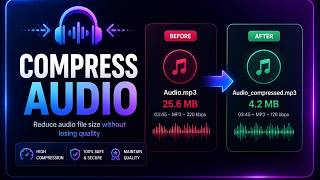
Shrink MP3, AAC, and other audio files offline. Pick a bitrate from 64 kbps to 320 kbps. Lossless formats like WAV and FLAC auto-convert to MP3. Works on hour-long podcasts and GB-sized recordings without uploading a single byte.
Compress Audio Files
Shrink 100 MB WAV to 6 MB MP3
Drop the bitrate and the file size drops with it. Originals stay untouched. Output lands next to the source with a _compressed suffix.
Note: Tip: 128 kbps is transparent for podcasts and voice. 192 kbps is the sweet spot for music.
Why Desktop Audio Compression Beats Online Tools
| Feature | Online Tools | Diwadi Desktop |
|---|---|---|
| Upload Required | ❌ Required | 🎯 Never |
| File Size Limit | ❌ 50MB max | ♾️ Unlimited |
| Speed | ⏳ Slow (upload/download) | ⚡ Instant |
| Batch Processing | ❌ 1 file | ✅ 1000s |
| Privacy | ⚠️ Risky (cloud upload) | 🔒 100% Local |
| AI Features | ❌ No | 🤖 Yes |
| Offline | ❌ No | ✅ Yes |
| Cost | Free | Free ✅ |
Which Bitrate Should You Pick?
Lower bitrate = smaller file. Here's what each setting sounds like and how much space it saves.
| Bitrate | Best For | Perceived Quality | Typical Size |
|---|---|---|---|
| 64 kbps | Voice memos, phone calls, audiobooks | Adequate for speech | ~0.5 MB/min |
| 128 kbps | Podcasts, radio, interviews | Transparent for voice | ~1 MB/min |
| 192 kbps | Music, general listening | Near-CD quality | ~1.5 MB/min |
| 256 kbps | High-fidelity music | Transparent for most ears | ~2 MB/min |
| 320 kbps | Archival, audiophile | Max MP3 quality | ~2.5 MB/min |
Rule of thumb: if you're not sure, pick 128 kbps. Most listeners can't tell it apart from the original on consumer gear.
New to this? Read How to compress audio on Mac and Windows for step-by-step instructions and the myths to avoid.
How It Works
Download & Install
Takes just 30 seconds. No account, no credit card required.
Browse & Select Your Audio Files
Navigate your files like a regular file browser. Batch processing supported.
Get Compressed Audio (Instant)
Processing happens locally on your computer. No upload wait.
When You Need This
Real situations where audio compression solves a problem.
Podcast too large to upload
Most podcast hosts accept up to 200-500 MB. An hour of uncompressed recording can be 600 MB. Compress to 128 kbps MP3 and it drops to about 60 MB.
Voice memos clogging phone storage
Dump a folder of M4A recordings onto your desktop, batch-compress to 64 kbps, and reclaim 80% of the storage without losing clarity.
Email attachment size limit
Gmail caps at 25 MB. A 20-minute WAV recording is 200 MB. Compress to 192 kbps MP3 and it fits comfortably under the limit.
Archiving a music library
Batch-compress ripped CDs from WAV or FLAC down to 256 kbps MP3. A 1 TB library becomes 100 GB with effectively identical sound.
Why Choose Diwadi Desktop?
Privacy First
Files never leave your computer. No cloud upload, no data collection, 100% local.
Lightning Fast
Process files 10x faster than online tools. No upload wait, no download wait.
No Limits
Convert unlimited files of any size. Batch process thousands in one click.
AI-Powered
Smart formatting detection, auto-cleanup, better accuracy.
Works Offline
No internet required. Perfect for flights, secure environments.
Free to Use
No trial limits, no watermarks, no credit card required.
Frequently Asked Questions
How does audio compression work?
Audio compression re-encodes your file at a lower bitrate. Lower bitrate means smaller file size but slightly less detail. For speech and podcasts, 64-128 kbps is transparent. For music, 192-256 kbps keeps near-CD quality. Diwadi uses FFmpeg's LAME encoder (MP3), native AAC, Vorbis (OGG), and flac encoders - the same tools professional studios use.
Which bitrate should I choose?
For voice, podcasts, and audiobooks: 64-96 kbps cuts files to a third of their size with no perceptible loss. For music, 192 kbps is the sweet spot between quality and size. 320 kbps is the highest MP3 bitrate - use it when you want maximum quality. If you're unsure, start at 128 kbps and listen.
What happens when I compress a WAV or FLAC file?
WAV and FLAC are lossless - they don't have a bitrate you can lower. Diwadi automatically converts them to MP3 at your chosen bitrate. A 100 MB WAV file typically shrinks to 5-10 MB as MP3 at 192 kbps.
Can I batch compress a folder of audio files?
Yes. Select multiple files or a folder, choose a bitrate, and Diwadi compresses them in parallel. Output goes to a new folder named 'compressed_{bitrate}' (for example 'compressed_128k') so your originals stay intact. Works on playlists, audiobook chapters, recording archives - whatever's on disk.
Will compressing audio reduce quality?
Lossy compression removes inaudible frequencies, so technically yes - but at reasonable bitrates you cannot hear the difference. 128 kbps MP3 is transparent for most listeners on consumer speakers and earbuds. Dropping below 96 kbps for music starts producing artifacts (watery cymbals, hollow vocals).
Does compressing audio keep my metadata and cover art?
Text metadata (title, artist, album, year) is preserved because FFmpeg copies it by default. Embedded cover art is dropped during compression - this is intentional since a 5 MB album image defeats the purpose of shrinking the file. If you want to strip text tags too, use the separate Remove Audio Metadata tool.
Is there a file size limit?
No. Because Diwadi runs on your computer, not a server, you can compress a 10 GB uncompressed recording as easily as a 5 MB clip. Online compressors typically cap uploads at 100-500 MB.
Do I need ffmpeg installed separately?
No. Diwadi bundles FFmpeg - one download, everything works. You do not need command-line skills, Homebrew, or any terminal commands.
You might also need:
Learn More
Comparisons and alternatives for audio transcription