PDF Splitter - Free Desktop App
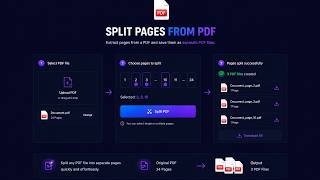
Split PDFs into separate files. Extract specific pages, split by ranges, or separate every page. No uploads, works offline.
Split Your PDF
Split unlimited PDFs
Your PDF will be split according to your preferences. Extract specific pages, split by ranges, or create individual files for each page.
Note: All processing happens locally on your computer. Your files never leave your device.
Why Desktop PDF Splitter Beats Online Tools
| Feature | Online Tools | Diwadi Desktop |
|---|---|---|
| Upload Required | ❌ Required | 🎯 Never |
| File Size Limit | ❌ 50MB max | ♾️ Unlimited |
| Speed | ⏳ Slow (upload/download) | ⚡ Instant |
| Batch Processing | ❌ 1 file | ✅ 1000s |
| Privacy | ⚠️ Risky (cloud upload) | 🔒 100% Local |
| AI Features | ❌ No | 🤖 Yes |
| Offline | ❌ No | ✅ Yes |
| Cost | Free | Free ✅ |
How It Works
Download & Install
Takes just 30 seconds. No account, no credit card required.
Browse & Select Your PDF File
Navigate your files like a regular file browser. Batch processing supported.
Get Multiple PDF Files (Instant)
Processing happens locally on your computer. No upload wait.
Multiple Ways to Split
Choose the splitting method that fits your needs
Extract Pages
Select specific pages (e.g., 1, 3, 5-7) to extract into a new PDF
Split by Range
Split into multiple PDFs by page ranges (e.g., 1-10, 11-20)
Every Page
Create a separate PDF file for each page in the document
Even/Odd Pages
Separate even and odd pages into two different PDF files
Why Choose Diwadi Desktop?
Privacy First
Files never leave your computer. No cloud upload, no data collection, 100% local.
Lightning Fast
Process files 10x faster than online tools. No upload wait, no download wait.
No Limits
Convert unlimited files of any size. Batch process thousands in one click.
AI-Powered
Smart formatting detection, auto-cleanup, better accuracy.
Works Offline
No internet required. Perfect for flights, secure environments.
Free to Use
No trial limits, no watermarks, no credit card required.
When You Need This
Real scenarios where splitting a PDF solves a specific problem.
PDF too large for email — split it
When compression isn't enough, split a large PDF into smaller parts that fit within Gmail's 25MB or Outlook's 10MB limit.
Learn more →Split exhibits for court e-filing
CM/ECF and other e-filing systems limit individual document sizes. Split large filings into separate exhibit PDFs.
Learn more →Portal rejects your large PDF
When a portal has a strict upload limit and compression alone won't get you there, split into logical sections.
Learn more →How to split a PDF on Mac and Windows
The exact Mac Preview and Automator steps, the honest Windows browser print-to-PDF caveats, and how to split the same way on both platforms offline.
Learn more →Frequently Asked Questions
Is the PDF splitter really free?
Yes, completely free with no limits. Split unlimited PDF files of any size, as many times as you want. No watermarks, no signup, no credit card required.
Do my PDFs get uploaded to a server?
Never. All PDF splitting happens locally on your computer. Your files never leave your device - perfect for sensitive documents.
Can I extract specific pages?
Yes! Enter page numbers (e.g., 1, 3, 5) or ranges (e.g., 1-5, 10-15) to extract exactly the pages you need into a new PDF.
What happens to bookmarks when splitting?
You can choose to preserve bookmarks in split files. Bookmarks relevant to the extracted pages will be included in the new PDF.
Can I split a PDF into individual pages?
Yes! Use 'Every page as separate file' mode to create a separate PDF for each page. A 100-page PDF becomes 100 individual files.
Can I split password-protected PDFs?
Yes, if you know the password. Enter the password when prompted, and Diwadi will split the file according to your preferences.
Does it work offline?
Yes, Diwadi works 100% offline after installation. No internet required for PDF splitting.
What platforms are supported?
Mac (Apple Silicon and Intel), Windows (10, 11). Download the version for your operating system.